RTL for Confluence – Native RTL & Bulk Fix (previously
referred to as RTL Pro) corrects right-to-left text that reads in the wrong order
on Confluence Cloud pages — in the page body, the page title and the
comments — and moves list markers to the right.
It rewrites the page’s own content in Confluence’s own format. There is no
macro and no wrapper: your text stays ordinary page text, so it is still searched,
still indexed, still exported, and still there if you ever remove the app.
Reading order, not alignment
This is the distinction the whole app rests on. Confluence’s toolbar already has
an align-right button, and it writes the same alignment mark this app writes.
Alignment decides which side of the page a block sits on. It says nothing about the
order the words are read in, because Confluence’s storage format has no concept
of text direction at all.
Written
أول MIDDLE آخر
Confluence, with or without align-right
Reads last → middle → first
After a fix
Reads in the correct order
The same applies without any English in the sentence: an ordinary Arabic sentence
ending in a full stop renders that full stop at the far right, before the sentence,
until the reading order is corrected.
At a glance
Hosting
Confluence Cloud only — there is no Server or Data Center version
Vendor
Contextra Labs
Built with
Atlassian Forge
Data residency
No external domains declared, no third-party network requests — content never leaves Atlassian infrastructure
Languages
Arabic, Persian, Urdu and other right-to-left scripts. The app’s own interface ships in English and Arabic.
2. Prerequisites
Requirement
Why
Confluence Cloud
The app is a Forge app and runs on Cloud only.
An active licence or trial
Without one the panel reports “RTL formatting is paused — no active licence. Your content is unchanged.” and nothing is written to any page.
Permission to edit the page
Needed only for manual fixes. A manual fix runs as you, so the app can never change a page you could not edit by hand.
Space administrator
Needed to reach space settings, where the defaults, the automatic-fix switch and the whole-space bulk fixer live.
On authority: automatic
fixes are written with the app’s authority, because a background
trigger has no user session. Manual fixes — the byline check and the bulk
fixer — run as the person who clicked.
3. Installation
Open the app’s listing on the Atlassian Marketplace.
Click Try it free (or Buy now) and choose the Confluence site to install on.
Confirm the requested permissions. They are listed in full in section 4.
Wait for the install to complete. No configuration is required to start — the app ships with working defaults and automatic fixing already on.
Where the app appears
Surface
Where to find it
What it does
Right-to-left check
The byline row under any page title, alongside “Add a reaction”
Checks and fixes the page you are looking at
RTL Defaults
Space settings → Integrations
Space defaults, the automatic-fix switch, and the whole-space bulk fixer
Automatic fixing
No interface — runs on page create and page update
Fixes a page the moment it is saved. On by default.
Nothing changes on install.
Existing pages are untouched until someone runs the check, runs a space scan, or
saves a page while automatic fixing is on.
4. Permissions
The app requests six scopes, and no others:
Scope
Why it is needed
read:page:confluence
Read the page to find text that reads in the wrong order
write:page:confluence
Write the corrected page back
read:comment:confluence
Find comments with the same problem
write:comment:confluence
Write corrected comments back
read:confluence-content.summary
Required by the page-created and page-updated events themselves, not by any call the app makes
storage:app
Store your settings, the trial counter, and which pages you un-fixed
Runs on Atlassian
The app declares no external domains and makes no network request
to any third party. Your content is never sent anywhere outside Atlassian
infrastructure, and the app stores no page content of its own — only your
settings, the trial counter, and a record of which pages have been un-fixed.
The only outward links anywhere in the interface are the two buttons in the
feedback prompt, “Rate on the Marketplace” and “Send private
feedback”, which hand a URL to your browser when you click them.
5. Configuration
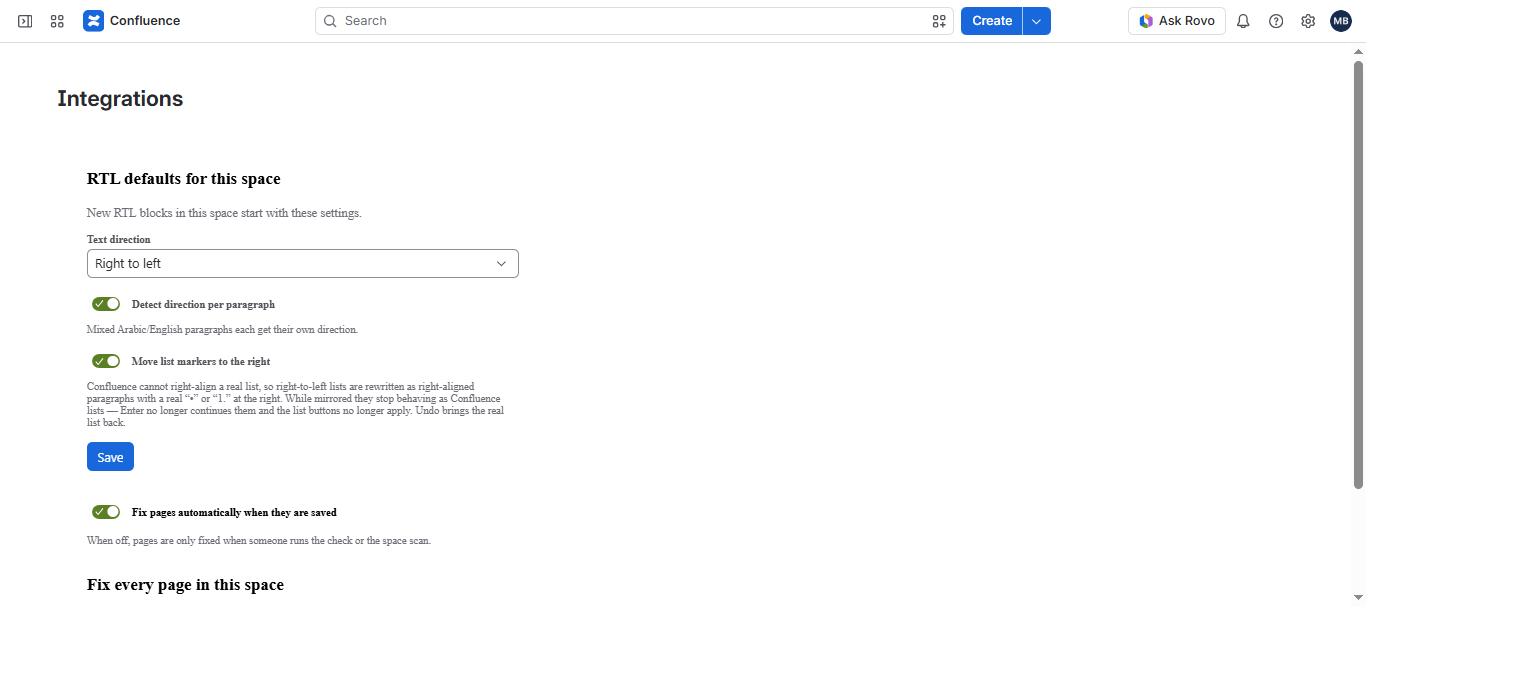
Go to Space settings → Integrations and find
RTL defaults for this space.
Space settings, under the Integrations page.
The three defaults
Field
Options
Default
What it does
Text direction
Right to left · Left to right · Detect automatically
Right to left
The direction assumed for content in this space. “Detect automatically” decides from the text itself.
Detect direction per paragraph
On · Off
On
Mixed Arabic/English paragraphs each get their own direction.
Move list markers to the right
On · Off
On
Confluence cannot right-align a real list, so right-to-left lists are rewritten as right-aligned paragraphs with a real “•” or “1.” at the right. While mirrored they stop behaving as Confluence lists — Enter no longer continues them and the list buttons no longer apply. Undo brings the real list back.
These three are saved together by the Save button.
Automatic fixing
Below Save sits a separate switch: “Fix pages automatically when
they are saved”, with the hint “When off, pages are only
fixed when someone runs the check or the space scan.”
It is on by default and saves the moment you toggle it, rather
than waiting for the Save button — this one switches automation that edits
pages, so the effect of toggling it should be immediate and obvious.
How settings resolve
Settings are layered. A more specific layer wins, and layers that set nothing fall
through to the one below:
Page
→
Space
→
Global
→
Built-in default
An explicitly-off toggle in a higher layer beats an on toggle below it —
switching something off is a real choice, not an absence of one.
On the trial allowance line. During a trial, whole-space bulk
fixing is capped at 10 pages in total. The remaining allowance is displayed
before you start on an evaluation licence; it is not shown on paid or
development installs, which have nothing to display.
6. Fixing One Page
This is the main entry point, and the fastest way to see what the app does.
Nothing is written until you click the fix button.
1
Open the check
Open any page containing right-to-left text. Under the page title, in the byline row next to “Add a reaction”, click Right-to-left check. A popup opens and starts reading the page.
Checking this page…
Panel wording, reproduced — not a screenshot.
2
Read what it found
The panel lists every block that reads in the wrong order, with a preview of each, and reports the page title and comments separately because they are separate content.
4 blocks of right-to-left text read in the wrong order.
The page title reads in the wrong order.
1 comment needs fixing.
Panel wording, reproduced — not a screenshot.
3
Read the preview before you click
Nothing is written until you ask for it. The panel states exactly what the fix will and will not do, including where alignment cannot be applied.
These will be reordered to read right to left. Paragraphs and headings are right-aligned too, using Confluence’s own alignment, so that part of the fix stays even if this app is removed. Text inside lists and panels is reordered but cannot be right-aligned.
Saved as a new page version — use page history to undo.
Panel wording, reproduced — not a screenshot.
4
Apply it
Click Fix reading order. The page is saved as an ordinary new version, attributed to you — a manual fix runs with your own permissions, so the app can never change a page you could not edit by hand.
Fixed 4 blocks.
Reload page to see the change
Panel wording, reproduced — not a screenshot.
5
Reload and check
Reload the page. Arabic sentences now read in the correct order, paragraphs and headings sit on the right, and list markers have moved. Re-open the check and it reports the page as clean.
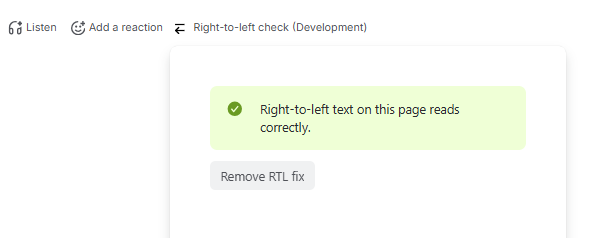
The panel on a page that has already been fixed. The “(Development)” suffix comes from a development install and does not appear on a Marketplace install.
Typing afterwards. Once a
page has been fixed, editing it flows right-to-left: the control characters live
in the text and the Confluence editor preserves them. A brand-new paragraph still
types left-to-right until the page is saved, at which point automatic fixing
corrects it.
7. Fixing a Whole Space
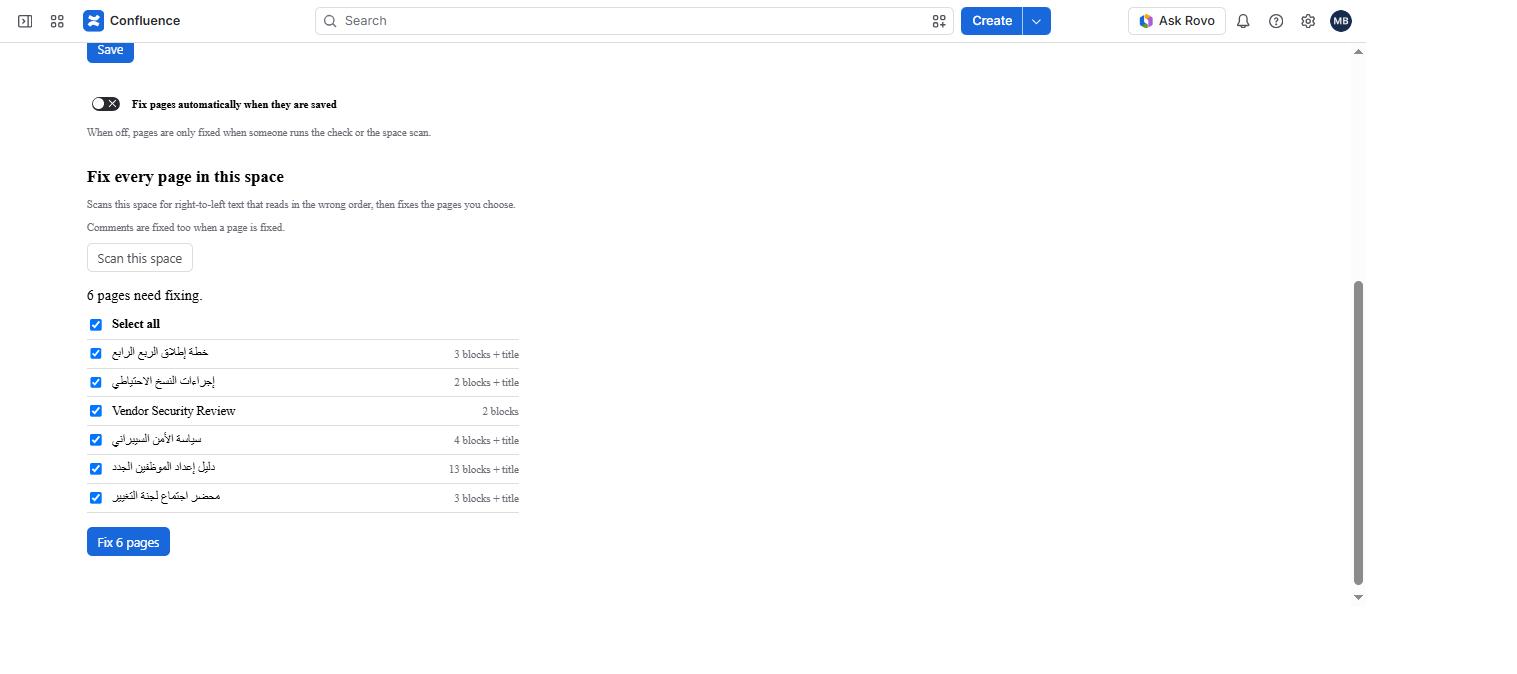
Go to Space settings → Integrations and scroll to
Fix every page in this space.
Click Scan this space. Progress is reported as it goes —
“Scanning… 42 pages checked”.
Review the results. Every page that needs work is listed by name with how much
will change on it — 3 blocks + title, 2 blocks,
and so on. A page with an English title and an Arabic body is found just the
same, because the scan reads bodies rather than titles alone.
Choose the pages you want, or use Select all, then click
Fix 6 pages.
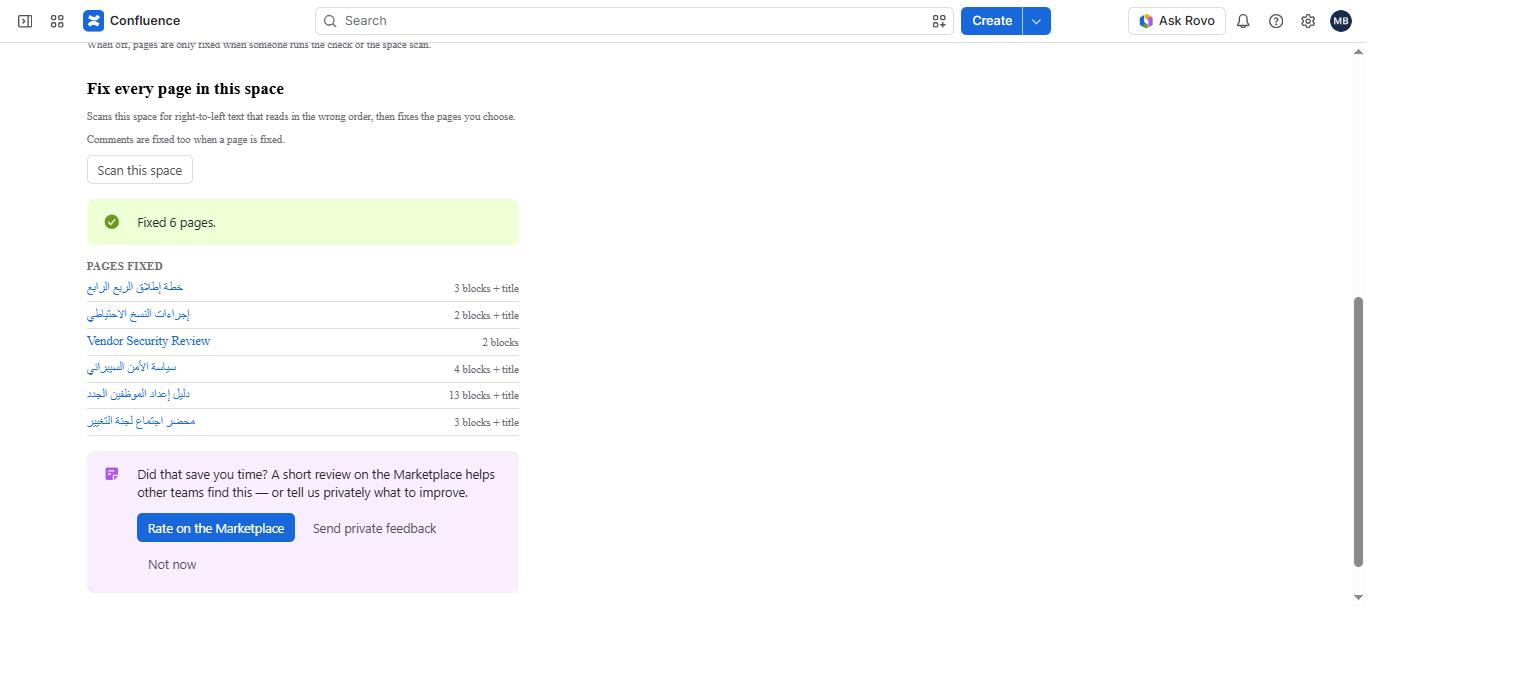
When it finishes you get the list back: every page it changed, by name, each one
a link you can open and check. Comments on those pages are fixed too.
Scan results: what needs fixing, and how much will change on each page —
before anything changes.
After the fix: every page that changed, named and linked, so you can open one and
check it.
Why it runs in batches
Both loops are driven from your browser rather than the server. A Forge resolver has
roughly 25 seconds to answer and there is no background queue, so the scan returns
one cursor-paged slice at a time (25 pages per call, 50 at most) and a fix handles
at most 10 pages per call. The interface makes many short calls and shows progress,
which is why a large space completes instead of timing out half-way through.
Page bodies arrive alongside the space listing, so a scan costs one request per
batch rather than one per page.
Trial cap. On a free trial, bulk fixing stops after 10 pages in
total across all runs. The panel reports how many were fixed and how many were
skipped. Per-page fixing, automatic fixing and undo are never capped.
8. Undoing a Fix
Open Right-to-left check on a fixed page and click
Remove RTL fix. It strips every character the app added, restores
real Confluence lists where they were mirrored, and reverses the alignment it
applied.
The panel on a page that has already been fixed: it confirms the page is clean and
offers Remove RTL fix. The “(Development)” suffix in
the byline comes from a development install and does not appear on a Marketplace
install.
Afterwards the panel confirms:
Removed. The page is back to how it was, and automatic fixing will leave it alone until you fix it again.
Panel wording, reproduced — not a screenshot.
That last clause matters: a page you have deliberately un-fixed is remembered, so
automatic fixing does not undo your decision the next time someone saves it.
Page history works too
Every change the app makes — manual or automatic — is an ordinary
Confluence page version with a descriptive message. You can see it in page history
and roll it back with Confluence’s own tools, without involving the app at all.
9. Sample Test Document
A ready-made Arabic document for validating the app end to end. It is
deliberately unfixed: it contains no Unicode bidirectional control
characters and no alignment marks, so Confluence displays it with the defect intact
— which is the point. You see the problem, then you fix it.
Why it looks fine here:
your browser implements the Unicode bidirectional algorithm, so it renders this
text correctly. Confluence does not apply direction to page content at all, which
is exactly the gap this app closes. Paste it into a Confluence page to see the
difference.
Step 1 — the page title
Create a new Confluence page and put this in the title field:
محضر اجتماع فريق المنتج — مراجعة الربع الأول
Step 2 — the page body
Copy the body and paste it into the page. The copy carries formatting, so headings,
lists and the table survive the paste.
بدأت سارة بعرض نتائج الربع الأول، وأشارت إلى أن معدل التفعيل ارتفع من 42% إلى 58% خلال ثلاثة أشهر. هذا الرقم يتجاوز الهدف المتفق عليه في اجتماع يناير.
ناقش الفريق مشكلة بطء التحميل في Confluence عند فتح الصفحات التي تحتوي على أكثر من 200 تعليق. اقترح محمد استخدام pagination بدلاً من تحميل كل التعليقات دفعة واحدة، على أن يتم القياس أولاً باستخدام Chrome DevTools.
This paragraph is written entirely in English and contains no right-to-left text at all. It is here as a control: the app must leave it exactly as it is, with no reordering and no alignment change.
جدول الأعمال
مراجعة نتائج الربع الأول ومقارنتها بخطة يناير.
خطة إطلاق ميزة SSO على مرحلتين.
مشاكل الأداء في Confluence عند تحميل التعليقات.
القرارات
تأجيل ترحيل قاعدة البيانات إلى PostgreSQL 16 حتى الربع الثالث.
تكليف Omar بإعداد قياس الأداء قبل يوم 20 مايو.
اعتماد خطة إطلاق SSO على مرحلتين.
المخاطر
اختلاف تطبيق SAML بين مزودي الهوية:
اختبرنا Okta وAzure AD فقط حتى الآن.
لم يُختبر ADFS إطلاقاً.
ضيق الوقت المتاح قبل نهاية الربع.
المهام
المهمة
المسؤول
الموعد
تقرير قياس الأداء باستخدام Chrome DevTools
Omar
20 مايو
مسودة توثيق SSO
ليلى
25 مايو
مراجعة الأمان قبل الإطلاق
محمد
1 يونيو
المتابعة
تُراجع نتائج الإطلاق بعد 30 يوماً مع المدير المباشر، ويُرفع تقرير موجز إلى فريق Analytics.
Step 3 — add a comment
Publish the page, then add this as a comment, so the check has a comment to report:
راجعت الأرقام مع فريق Analytics، والرقم الصحيح هو 57% وليس 58%.
Step 4 — run the check and compare
Open Right-to-left check in the byline. This is what each element of
the sample should do:
Element
The check should report
After the fix
Should NOT change
Page title
“The page title reads in the wrong order.”
Reads in the correct order
Stays left-aligned — Confluence owns the title’s styling
Arabic paragraphs and headings
Counted in “N blocks of right-to-left text read in the wrong order.”
Reordered and right-aligned
—
Ordered and bulleted lists
Counted, with a preview of how many items will become paragraphs
Markers move to the right; items become right-aligned paragraphs
Real lists return on undo
The nested list under “المخاطر”
Reading order counted
Reading order fixed
Markers stay on the left; nesting is preserved
Table cells
Counted
Cell text reordered and right-aligned
Column order stays left-to-right
The English-only paragraph
Not counted
—
Completely untouched
The Arabic comment
“1 comment needs fixing.”
Reordered
—
Everything above, after Remove RTL fix
“There was nothing to remove.” once already clean
Page returns to its original state
Automatic fixing leaves the page alone until it is fixed again
The English paragraph is the control worth watching: it must come through the fix
completely untouched, with no reordering and no alignment change.
10. Before & After
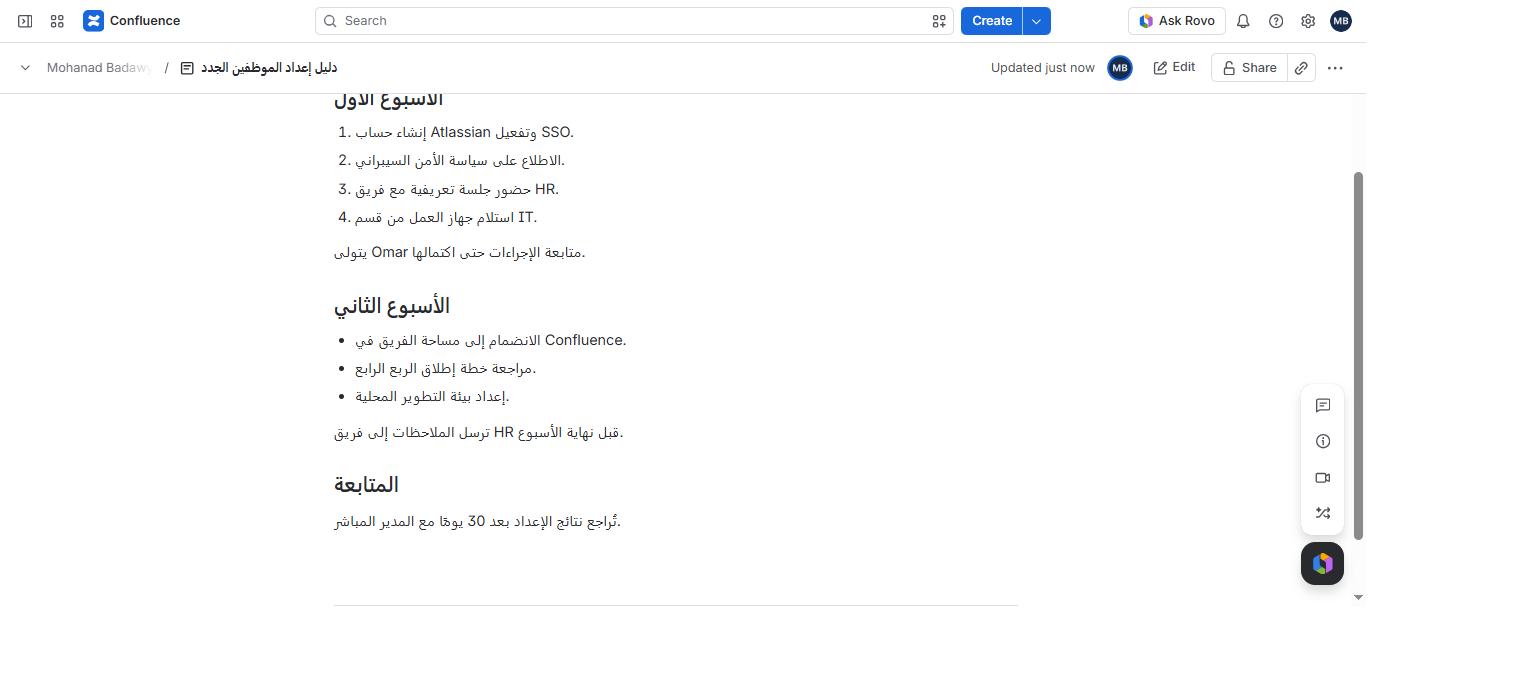
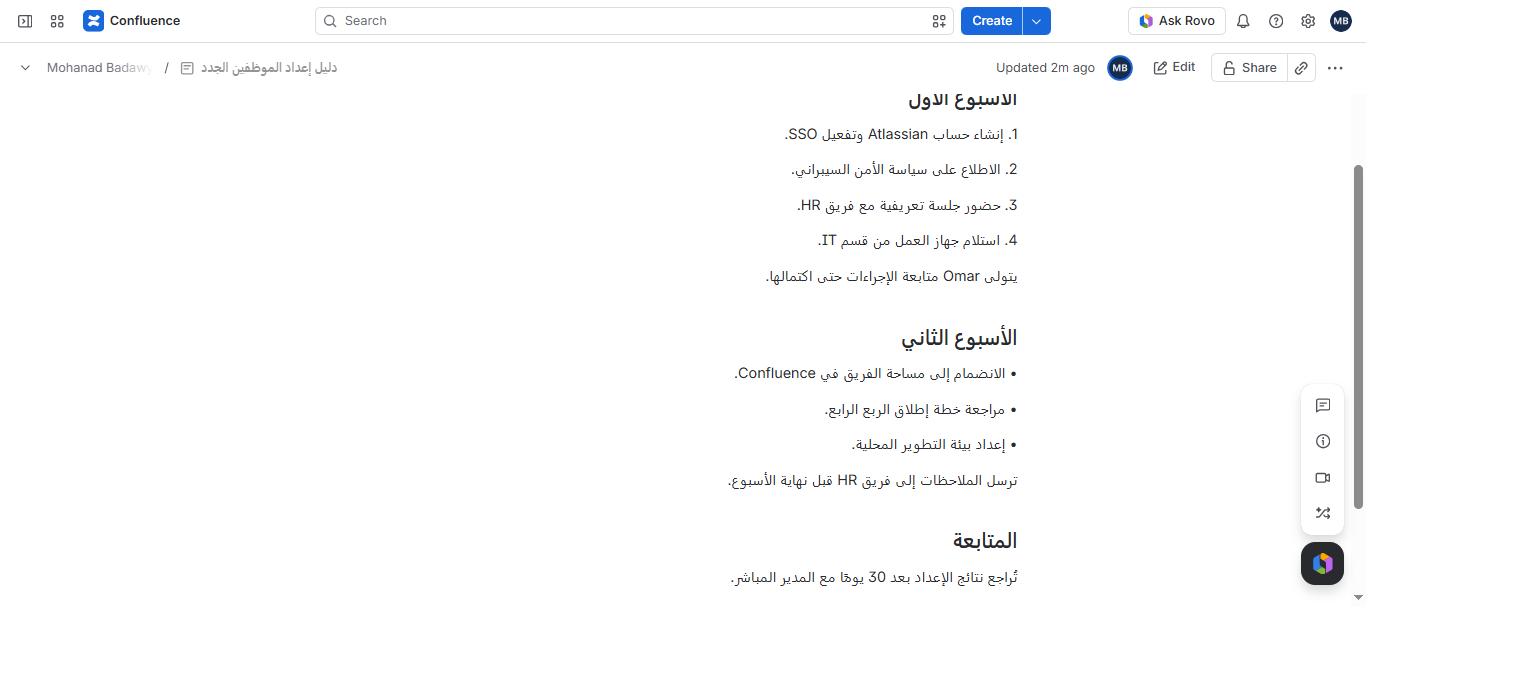
The same Confluence page, same framing, one fix apart. Look at the list markers:
in the first image the numbers and bullets sit on the left of Arabic text; in the
second they have moved to the right, where an Arabic reader expects them.
Before — markers on the left, words in the wrong order.After — correct reading order, markers on the right, content and structure unchanged.
11. Limitations
Confluence Cloud constrains what any app can change. These are published rather than
buried, because finding them after paying is worse for everyone.
The fix writes invisible characters into your text
Correcting reading order requires Unicode bidirectional control characters (U+202B / U+202C) in the page text, because Confluence’s storage format has no concept of direction. That is also why the fix survives export, search and uninstallation. It is fully reversible with Remove RTL fix, and every change is an ordinary page version.
A mirrored list is no longer a Confluence list
To put markers on the right, a right-to-left list is rewritten as right-aligned paragraphs each beginning with a real “•” or “1.”. While mirrored, Enter no longer continues the list, the toolbar’s list buttons no longer apply, and screen readers no longer announce it as a list. Switch “Move list markers to the right” off per space if you have an accessibility obligation, and accept markers on the left.
Lists containing a sub-list are skipped
Reading order is still corrected, but markers stay on the left. A nested level cannot be expressed as flat paragraphs without losing structure, and losing content would be worse than a marker on the wrong side.
Table column order stays left-to-right
Cell contents are reordered and right-aligned. The order of the columns themselves is not something Confluence’s format exposes, and reversing cells risks corrupting rowspan and colspan.
Some containers are reordered but not right-aligned
Text inside panels, quotes, expands and task lists — and the page title — is reordered, but Confluence only permits the alignment mark at the top level and in table cells. The title in particular is styled by Confluence itself and no Cloud app can change that.
A brand-new paragraph types left-to-right until it is saved
No Cloud app can restyle the Confluence editor. The correction applies to saved content. Once a paragraph has been fixed, editing it afterwards flows right-to-left, because the control characters live in the text and the editor preserves them.
Automatic fixes are written with the app’s authority
A background trigger has no user session, so pages fixed automatically on save are attributed to the app. Manual fixes run as the acting user.
Pages nobody touches are only fixed on demand
The trigger fires on saves. Pages that are never edited are corrected when someone runs the page check or the space scan — the app does not roam a site rewriting content it was never invoked on.
Trial cap: 10 pages of bulk fixing
During the free trial, the whole-space bulk fix is capped at 10 pages in total. Per-page fixing, automatic fixing and undo are never capped. On an evaluation licence the remaining allowance is shown before you start.
12. Troubleshooting
What you see
Why
What to do
RTL formatting is paused — no active licence. Your content is unchanged.
The app has no active licence or trial on this site.
Start a trial or subscribe from the Marketplace listing. Nothing is written to your pages while the licence is inactive.
You do not have permission to edit this page.
A manual fix runs with your own permissions.
Ask someone with edit permission on the page to run the fix, or leave automatic fixing on — the trigger runs with the app’s authority.
Someone else edited this page. Reload and try again.
The page changed between the check reading it and the fix writing it back.
Reload the page and run the check again. The app never overwrites a version it did not read.
This page could not be found.
The page was moved or deleted while the panel was open.
Reload the page.
This page was fixed after you opened it, so what you see is out of date.
Automatic fixing corrected the page after your browser rendered it.
Click Reload page to see the change.
The order still looks reversed after a fix
Usually a stale render rather than a bidi problem.
Reload before investigating. To confirm, compare the paragraph’s first code point in the DOM against the same paragraph from the REST API — if the API has U+202B and the DOM does not, the browser is showing a cached render.
A bulk fix stopped part-way through
On a trial, the 10-page allowance was used up.
The panel reports how many pages were fixed and how many were skipped. Subscribe to fix the rest; per-page fixing stays available either way.
13. Support
Email support@contextra-labs.com — questions, bug reports and feature requests all go to the same place.
Support page — response times and what to include in a report.
When reporting a problem with a specific page, the most useful details are the space
key, whether the fix was manual or automatic, and what the panel said.
محضر اجتماع فريق المنتج
الحضور: سارة، محمد، ليلى، Omar.
الملخص
بدأت سارة بعرض نتائج الربع الأول، وأشارت إلى أن معدل التفعيل ارتفع من 42% إلى 58% خلال ثلاثة أشهر. هذا الرقم يتجاوز الهدف المتفق عليه في اجتماع يناير.
ناقش الفريق مشكلة بطء التحميل في Confluence عند فتح الصفحات التي تحتوي على أكثر من 200 تعليق. اقترح محمد استخدام pagination بدلاً من تحميل كل التعليقات دفعة واحدة، على أن يتم القياس أولاً باستخدام Chrome DevTools.
This paragraph is written entirely in English and contains no right-to-left text at all. It is here as a control: the app must leave it exactly as it is, with no reordering and no alignment change.
جدول الأعمال
مراجعة نتائج الربع الأول ومقارنتها بخطة يناير.
خطة إطلاق ميزة SSO على مرحلتين.
مشاكل الأداء في Confluence عند تحميل التعليقات.
القرارات
تأجيل ترحيل قاعدة البيانات إلى PostgreSQL 16 حتى الربع الثالث.
تكليف Omar بإعداد قياس الأداء قبل يوم 20 مايو.
اعتماد خطة إطلاق SSO على مرحلتين.
المخاطر
اختلاف تطبيق SAML بين مزودي الهوية:
اختبرنا Okta وAzure AD فقط حتى الآن.
لم يُختبر ADFS إطلاقاً.
ضيق الوقت المتاح قبل نهاية الربع.
المهام
المهمة
المسؤول
الموعد
تقرير قياس الأداء باستخدام Chrome DevTools
Omar
20 مايو
مسودة توثيق SSO
ليلى
25 مايو
مراجعة الأمان قبل الإطلاق
محمد
1 يونيو
المتابعة
تُراجع نتائج الإطلاق بعد 30 يوماً مع المدير المباشر، ويُرفع تقرير موجز إلى فريق Analytics.
محضر اجتماع فريق المنتج
الحضور: سارة، محمد، ليلى، Omar.
الملخص
بدأت سارة بعرض نتائج الربع الأول، وأشارت إلى أن معدل التفعيل ارتفع من 42% إلى 58% خلال ثلاثة أشهر. هذا الرقم يتجاوز الهدف المتفق عليه في اجتماع يناير.
ناقش الفريق مشكلة بطء التحميل في Confluence عند فتح الصفحات التي تحتوي على أكثر من 200 تعليق. اقترح محمد استخدام pagination بدلاً من تحميل كل التعليقات دفعة واحدة، على أن يتم القياس أولاً باستخدام Chrome DevTools.
This paragraph is written entirely in English and contains no right-to-left text at all. It is here as a control: the app must leave it exactly as it is, with no reordering and no alignment change.
جدول الأعمال
1. مراجعة نتائج الربع الأول ومقارنتها بخطة يناير.
2. خطة إطلاق ميزة SSO على مرحلتين.
3. مشاكل الأداء في Confluence عند تحميل التعليقات.
القرارات
- تأجيل ترحيل قاعدة البيانات إلى PostgreSQL 16 حتى الربع الثالث.
- تكليف Omar بإعداد قياس الأداء قبل يوم 20 مايو.
- اعتماد خطة إطلاق SSO على مرحلتين.
المخاطر
- اختلاف تطبيق SAML بين مزودي الهوية:
- اختبرنا Okta وAzure AD فقط حتى الآن.
- لم يُختبر ADFS إطلاقاً.
- ضيق الوقت المتاح قبل نهاية الربع.
المهام
المهمة | المسؤول | الموعد
تقرير قياس الأداء باستخدام Chrome DevTools | Omar | 20 مايو
مسودة توثيق SSO | ليلى | 25 مايو
مراجعة الأمان قبل الإطلاق | محمد | 1 يونيو
المتابعة
تُراجع نتائج الإطلاق بعد 30 يوماً مع المدير المباشر، ويُرفع تقرير موجز إلى فريق Analytics. محضر اجتماع فريق المنتج — مراجعة الربع الأول راجعت الأرقام مع فريق Analytics، والرقم الصحيح هو 57% وليس 58%.